Photo Resizer - a light-weight Android app for offline single or batch image and photo resizing
DESCRIPTION
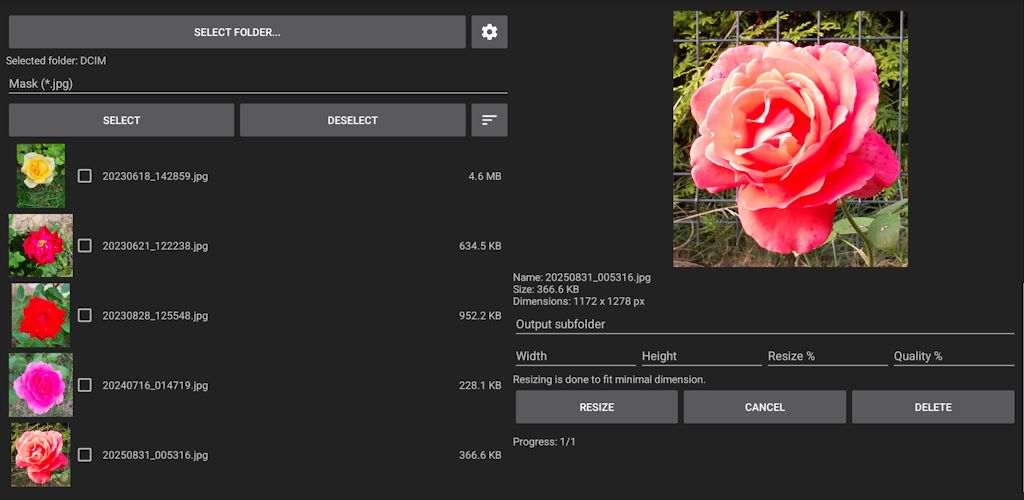
Offline Photo Resizer lets you resize, fit, crop, and convert photos completely offline. Resize a single image or a batch of photos by width, height, or percentage; adjust image quality; fit images to a background of any size and color; and save results in your preferred format and subfolder. Everything works without uploading anything to the internet, so your photos stay private on your device. The app also supports flipping, rotation, annotations, painting, measurements, and masking of personal information.
FEATURES
- Support for Android Storage Access Framework (SAF), allowing you to select folders with images using the standard Android interface. Typical folders include the phone’s or SD card’s DCIM, DCIM/Camera, or DCIM/Screenshots, depending on where photos are stored.
- Preview and open JPG/JPEG, PNG, WEBP, GIF, HEIC/HEIF, AVIF/AVIFS photos and images.
- Select multiple photos and perform batch resizing, fitting, or file‑format conversion in one go.
- All image processing and conversion is done entirely on your device without sending files anywhere.
- Select the desired output format for saved images: JPG, PNG, WEBP, PDF, or keep the same format as the input.
- Optionally enter a subfolder where output files will be stored, keeping them separate from input files.
- Proportionally resize photos by width or height in pixels.
- Resize photos by a desired percentage.
- Fit photos to specified dimensions (width and height in pixels) and fill the surrounding area with a selected background color. Colors can be chosen by entering RGB or HSV values, selecting from a palette, or using the list of last used colors.
- Select JPEG output quality in percentages (for example, 85 for standard quality; lower values for smaller file size; higher values for better quality).
- Create templates with desired resizing and fit parameters for social networks or other purposes, and reuse them later.
- Crop photos with preview and either save the cropped area or fit it to a desired image size. Background color can be selected using a color picker or palette.
- Flip photos horizontally or vertically; rotate by 90, 180, or 270 degrees.
- Annotate images by adding text, drawing lines, arrows, shapes, and markers with adjustable thickness, style, and color.
- Measure unknown distances, perimeters, or areas on a photo when a known physical reference is present. Measurements can be calibrated using that reference.
- Anonymize (blur or pixelate) faces, license plates, and other personal information before sharing.
- Share or delete selected files.
- Optionally select/deselect multiple files using masks.
- View the file list as text or text with thumbnail images.
- Sort files using your chosen criterion.
- Select preferred output PDF size, margins, image positioning/alignment, and DPI.
- Use preferred measurement units.
- Select your preferred user interface language, regardless of the system language.
- Note: Opening HEIC/HEIF and AVIF/AVIFS requires devices running Android 12 or above.
DISCLAIMER
This software is provided "as is" without any warranties of any kind, expressed or implied. The authors assume no responsibility or liability for any damages, data loss, or other consequences resulting from its use. By using this software, you acknowledge and agree that you alone are responsible for any outcomes arising from its use.
PRIVACY POLICY
This software itself does not collect, store or share any personal data. It may display advertisements through Google AdMob, so for Google's privacy and advertising policies check https://policies.google.com/technologies/ads
DOWNLOAD
https://play.google.com/store/apps/details?id=com.diproltu.photoresizer

MIRRORS
https://sites.google.com/view/diproltu
https://photoresizer-diproltu-com.web.app